

Introducing Fivetran Managed Data Lake Write Credentials
.png)

Current users of Fivetran Managed Data Lake know that decoupling storage from compute brings a host of benefits, from reducing ingestion costs to serving as the foundation for an Open Data Infrastructure. Ingesting data using Fivetran’s 750+ connectors into a managed data lake brings many advantages over classic data lakes and cloud data warehouse native storage:
- ACID compliance to ensure data integrity combined with the scale and flexibility of a data lake
- Reduced ingestion costs - as Fivetran pays the data movement fees
- Data landing in commodity storage buckets such AWS S3, Azure Data Lake, and Google Cloud Storage means that customers retain ownership and control
- Data stored in open, Apache Iceberg™ table format future-proofs data access and interoperability
- Data can be queried by multiple compute engines, including cloud data warehouses such as Snowflake, Google BigQuery, and Databricks.
This provides a modern, flexible, and cost-effective way to provide a data foundation for AI and human analytics, all based on Open Data Infrastructure principles - data is interoperable across query engines and stored under the user’s control in cost-effective buckets, free from vendor lock-in due to open data formats.
Fivetran Managed Data Lake is always improving, with new features and performance improvements added regularly.
[CTA_MODULE]
Announcing Managed Data Lake Write Credentials
Now generally available to all users, Managed Data Lake Write Credentials provides the ability to execute DDL and DML operations against the data lake, unlocking the ability to:
- Delete records from Managed Data Lake tables - e.g. if you need to remove customer records in response to a GDPR request
- Drop Managed Data Lake tables entirely - e.g. if you need to remove tables no longer needed
This functionality is made available to Managed Data Lake users by providing a second set of credentials to access the hosted Apache Polaris™ catalog — the difference is these credentials have write access. You’ll need to be either a Destination Admin or Account Admin to see them; it’s not for general use.
It was implemented this way as you likely have many more users, tools, and agents who need to read from the lake, with writing limited to specific users or situations. By providing new credentials, you can ensure that no user or tool who previously could only read can now write, while giving write access to those that need it.
This ability has massively increased the use cases and workloads that can be migrated to Fivetran Managed Data Lake, enabling migrations away from cloud data warehouses.
Precautions
When using a set of write credentials to execute DDL and DML, you are altering the data stored in your Fivetran Managed Data Lake. Make sure you trust the engine you’re using and understand what it is doing. Otherwise, data might be lost or corrupted, or the correctness or success of future syncs may be affected.
Note that this is primarily for use with Apache Iceberg tables - if you need to amend data and access via Delta Lake, please reach out to support first.
It is highly recommended that you pause the Fivetran Connectors that write to the table(s) you are planning to amend before issuing DDL or DML statements. Altering tables while a Fivetran Connection is not paused can result in permanent data loss.
How to use
Let’s go through an example where I’m looking to remove some invalid records from a table in a Fivetran Managed Data Lake. I’m going to set this up as a separate Snowflake catalog integration and use Snowsight. By using Snowflake you can use the Horizon catalog to limit write access to specific users - which is best practice.
The problem to fix
Due to an upstream error in my source database some invalid OUTGOING tariffs have been loaded into my data lake - I’d like to remove these. If we look at the results of this query we can see 28 distinct tariffs, with many containing OUTGOING in the tariff_code:
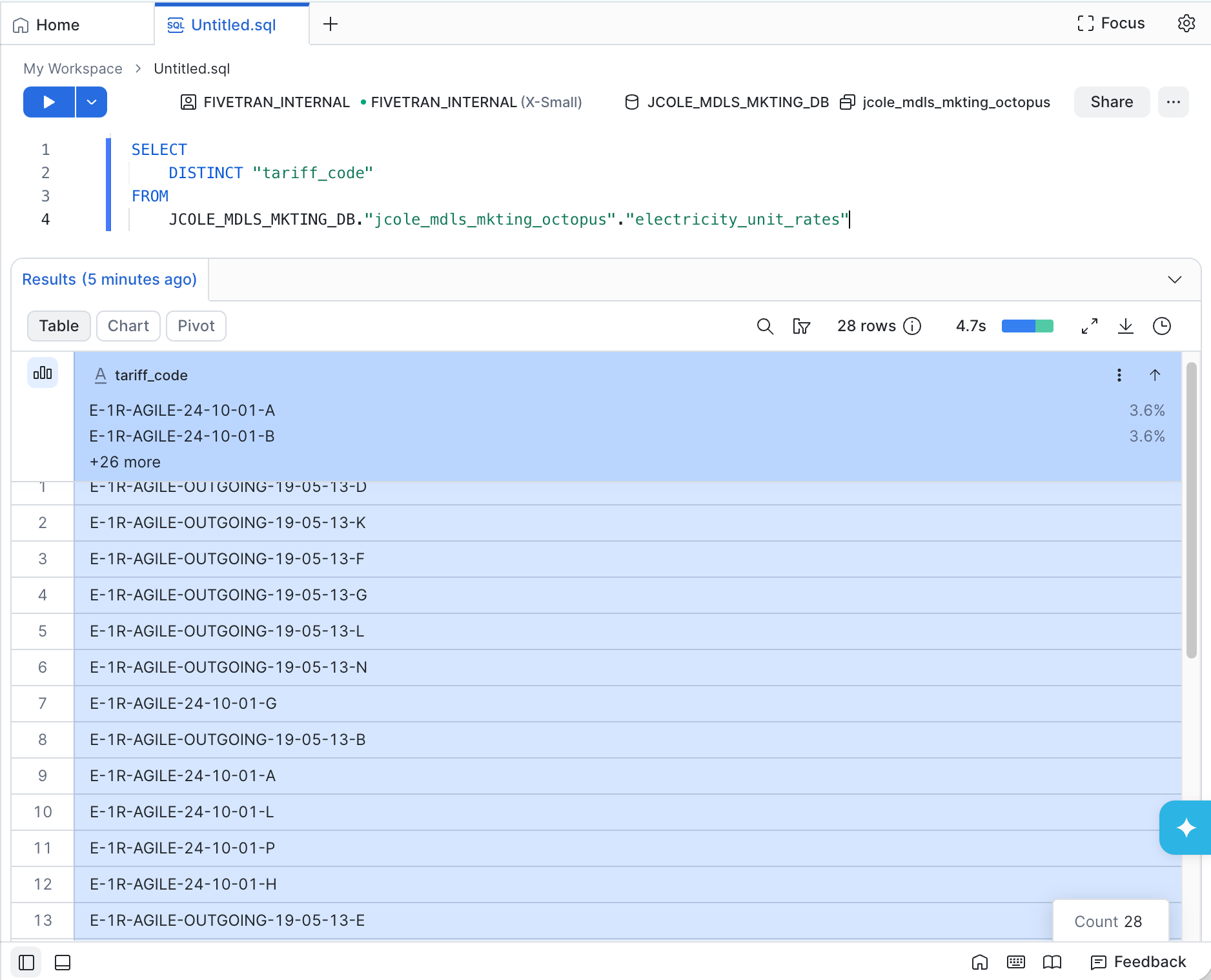
However - trying to delete these through the existing catalog credentials will not work - as this is read only.

This is by design - the majority is users and applications should not be writing to the data lake. However, Write Credentials does allow this for specific use cases such as this. I’m going to create a new writable Snowflake catalog integration to allow me to fix the data.
Where to find your Write Credentials
These are provided as a new set of credentials for accessing your data lake with extra permissions. I first need to log into my Fivetran control panel, click Destinations, then find the Managed Data Lake destination I want to use. I click into this, then look for the Write Credentials tab to find my new credentials:

If this is the first time using Write Credentials on an existing destination, you may need to click the Regenerate client secret button.
Note: the Client Secret will only be shown when you successfully generate credentials. For security reasons, it cannot be retrieved later. Make sure you note this in a secure location.
Creating the new writable catalog
Rather than amend the existing catalog to use the write credentials I am going to create a new catalog and linked database - this is so I can limit who can access it to prevent accidental data loss.
This new catalog will be pointing at the same underlying data lake files, metadata and hosted Apache Polaris™ catalog - so changes made here will be reflected in the original linked catalog.
First the CATALOG INTEGRATION - I run this in Snowflake remembering to replace the placeholder values with the values from Write Credentials screen I recorded earlier
For more see the steps in the Snowflake setup guide - but remember to use the credentials from the Write Credentials screen.
CREATE OR REPLACE CATALOG INTEGRATION jcole_catalog_int_mdls_writer
  CATALOG_SOURCE = POLARIS
  TABLE_FORMAT = ICEBERG
  CATALOG_NAMESPACE = '{fivetran_delivered_schema_name}'
  REST_CONFIG = (
    ACCESS_DELEGATION_MODE = VENDED_CREDENTIALS,
    CATALOG_URI = 'https://<url>.eu-west-1.aws.polaris.fivetran.com/api/catalog'
    WAREHOUSE = 'barometer_mentioning'
  )
  REST_AUTHENTICATION = (
    TYPE = OAUTH
    OAUTH_TOKEN_URI = 'https://<url>.eu-west-1.aws.polaris.fivetran.com/api/catalog/v1/oauth/tokens'
    OAUTH_CLIENT_ID = '<oauth_client_id_from_fivetran>'
    OAUTH_CLIENT_SECRET = '<oauth_client_secret_from_fivetran>'
    OAUTH_ALLOWED_SCOPES = ('PRINCIPAL_ROLE:ALL')
  )
  ENABLED = TRUE,
  REFRESH_INTERVAL_SECONDS = 60; -- Configurable: adjust this value to control how often Snowflake refreshes the catalog integration
Then create the catalog-linked database - note I’ve called this the same as the read-only version but appended with _writable so it is clear this is the writable one. The catalog is the one created above.
CREATE DATABASE jcole_catalog_int_mdls_writer
  LINKED_CATALOG = (
    CATALOG = 'jcole_catalog_int_mdls_writer'
  );
Now queries run against the JCOLE_MDLS_MKTING_DB_WRITABLE database will accept updates and deletes, and changes will also be reflected in the read-only JCOLE_MDLS_MKTING_DB database.
Let’s get rid of the OUTGOING tariffs.
Fixing the data
First part - I need to use the Fivetran UI to pause my connection so data is not corrupted:

Let’s try that DELETE FROM query again - this time updating to use the writable database:

Note: you may need to wait for your catalog to refresh so changes are visible.
Ok - now I’m going to rerun the original query against the original read-only database:
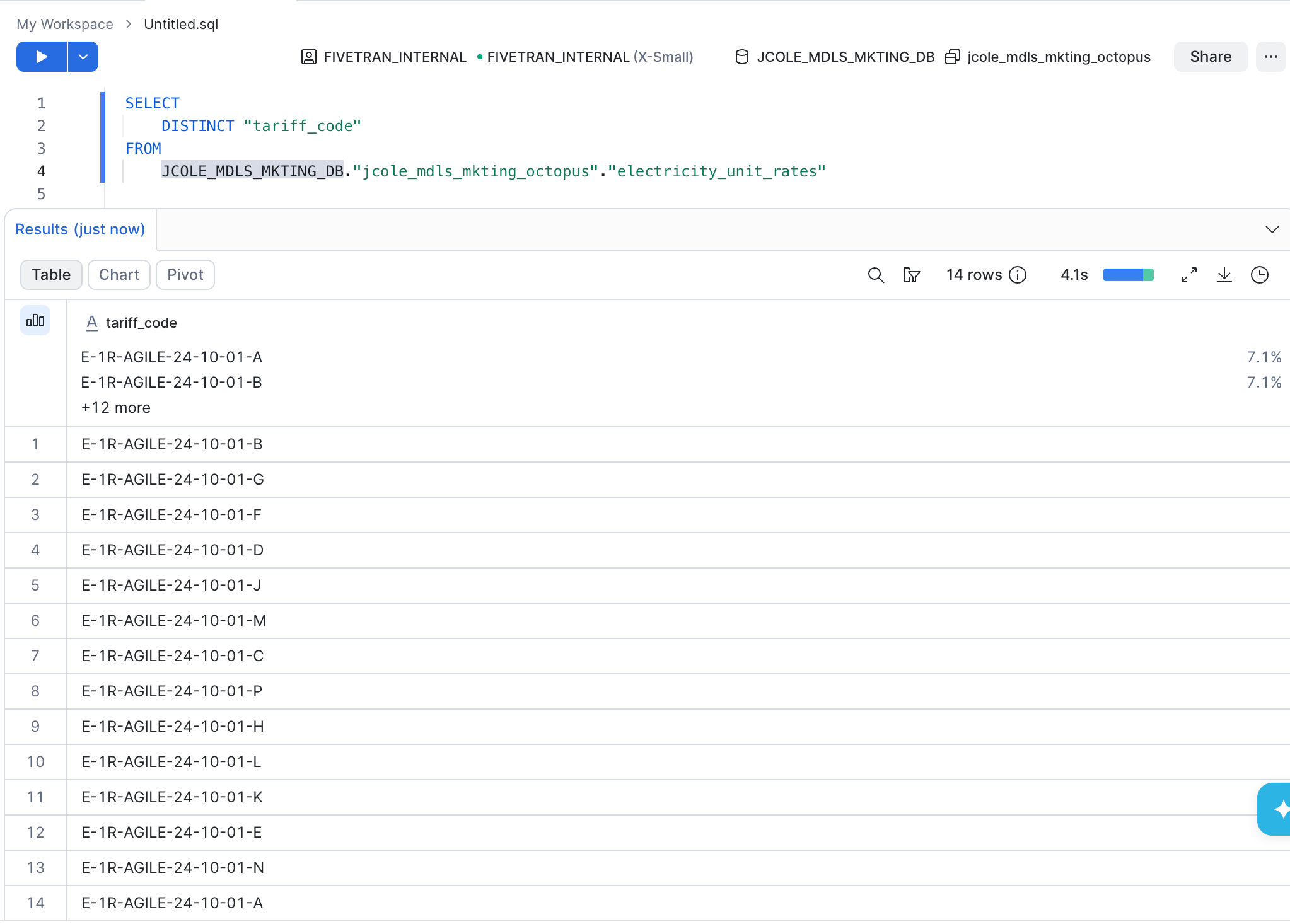
Invalid records are successfully removed - only 14 distinct tariff_code values and none contain OUTGOING
One last step - re-enable the connector to make changes and start sync again:

Conclusion
We’ve seen in this blog how the release of Write Credentials has made writes and deletions now available on Fivetran Managed Data Lake destinations, making it possible to migrate more data stores to an open, interoperable, and lower-cost Open Data Infrastructure architecture fueled by Fivetran.
This means more use cases are unlocked - you may wish to investigate upgrading your storage to gain the benefits of more cost-effective, open, and interoperable storage than simply using your cloud data warehouse native storage!
[CTA_MODULE]
Related blog posts
Start for free
Join the thousands of companies using Fivetran to centralize and transform their data.





