How Pleo achieved Customer 360 utopia

Pleo operationalized Customer 360 data in HubSpot without sacrificing governance or accuracy.
February 6, 2026

In the bustling world of modern business, Pleo faced a dilemma all too familiar — a tightrope walk between crafting compelling and targeted marketing campaigns and keeping data security compliant. It was in this balancing act that the perfect solution emerged: HubSpot Association Labels plus Fivetran Activations.

At Pleo, the RevOps team is working to catalog product users into HubSpot. Keeping them separate from potential leads is crucial; otherwise, they wouldn't be able to run efficient marketing campaigns.

But differentiating between marketing and product users is complex because these roles often swap quickly — a marketing user can very quickly become a product user — and on top of that, one user can have multiple profiles on different accounts. Currently, that information is lost in the void.

Moreover, Pleo is a financial institution, so not everyone working with the data should get VIP access to it. That’s where leveraging HubSpot Association Labels in tandem with Fivetran Activations can operationalize data and drive revenue growth. 

What are HubSpot Association Labels? 

HubSpot, a leading customer relationship management (CRM) platform, offers a powerful tool known as "Association Labels" to help businesses make sense of complex relationships between customers, companies, deals, and more.

Hubspot Association Labels are the backbone of relationship mapping within the HubSpot ecosystem, allowing you to link contacts to companies, deals, support tickets, and other relevant data points.

In the age of customer-centricity, associating these objects gives you a holistic, 360° perspective of each customer — facilitating personalized communication, targeted marketing, and enhanced customer experiences.  

Achieving a Customer 360 utopia

First, you’ll need to understand how your contacts and companies fit together. One Contact — one real person — can have multiple distinct product profiles. For example, when one person can be an admin of one product and a user of another, you need to be able to illustrate that. You can leverage the Association Labels feature in HubSpot to show these relationships.

Let’s take an example of the Byte Group and their daughter company, ByteOperations UK. The companies both have acquired Pleo accounts.

Sienna Collins is the CFO for the Byte Group. Because the Group works out of The Netherlands but operates in different markets like the UK, Germany, and Spain, she needed to implement an efficient spend management solution like Pleo to manage the rapidly growing company and get a better overview of spend behavior across the Group.

But this has led to Sienna being associated in different ways with each company. She has different roles in Byte Group and ByteOperations UK. It’s important for Pleo to be on top of Sienna’s multiple roles within different workspaces.

Her current roles in her Pleo instances are:

  • At Byte Group, Sienna has the role of an Admin. She is the one responsible for her company's Pleo account. She is ultimately the one in charge of inviting or removing users and loading money for her team to spend, and she is also the direct point of contact for Pleo's commercial teams across the Group.
  • At ByteOperations UK, her role is completely different in this second Pleo account. She is a Bookkeeper. Sienna wants to keep an eye on company spend as well as export expenses (with photos of invoices attached) at the end of every month to streamline her bookkeeping tasks.
Relationships between Sienna Collins and the two different roles she fills at both companies

Sienna's diverse roles illustrate how one individual can wear multiple hats within various companies. The importance of accurate data associations to effectively manage and personalize interactions across these roles is paramount.

For example, because Sienna holds both the Admin and Bookkeeper roles, we might want to include her in different marketing campaigns targeting both those roles. Another user who is only a Bookkeeper can easily be excluded from irrelevant HubSpot workflows for campaigns directed at Admins, but before Association Labels, it wasn’t so easy for a user like Sienna. 

How to set up Association Labels in HubSpot

To set this up in HubSpot, first create custom labels for Bookkeeper or Admin. These labels will represent the relationship types between contacts and companies.

When manually creating associations in HubSpot, you have the option to add an Association Label field. This is where you will select the appropriate custom label for each association. The screenshot below shows 2 Association Labels representing the roles: Admin and Bookkeeper.

Companies-to-Contacts Associations created in HubSpot

‎Instead of putting the labels directly on the contacts, you’ll label the associations between the contacts and companies. For example, in our example above:

  • Sienna Collins and Byte Group will have the Admin label
  • Sienna Collins and ByteOperations UK will have the Bookkeeper label

Now that we’ve set up Association Labels, and have an understanding of how one contact can act in different roles across different companies, Fivetran Activations can help operationalize this setup.

How to map HubSpot Association Labels

HubSpot Association Labels sound great, right?! But imagine having to set up those associations and labels manually for hundreds of companies and thousands of contacts. Not only is this very time-consuming, it is also error-prone. Luckily, Fivetran Activations can help.

Because you already have all your company and contact information in your data warehouse, Activations easily connects that source of truth to HubSpot, allowing you to set up a Companies sync that specifically associates the correct Contacts in HubSpot in five steps:

  1. Create a column in your Activations model on top of the Company table or view in your warehouse that represents each association — Bookkeepers and Admins. 
  2. Create a JSON array of the emails associated with each of the companies — putting them in the appropriate association column.
  3. ‎In Fivetran Activations, set up a HubSpot Company sync with the company_id or your unique identifier in HubSpot as the identifier.  
  4. Map each corresponding column in the model to your newly created Association Labels in HubSpot.
  5. Run your sync. HubSpot will reflect the new associations as soon as the sync is complete.

Achieving Customer 360 Utopia

HubSpot Association Labels have allowed Pleo to bridge the gap between intricate customer relationships and targeted marketing efforts. And when Association Labels are synced to HubSpot, a new world of opportunity opens up:

  • Personalized marketing campaigns: Leverage our enriched customer data to create highly targeted and personalized marketing campaigns across various channels, improving customer engagement and conversions.
  • Segmentation and lead scoring: Utilize the comprehensive customer view to develop precise audience segments and implement lead scoring models that identify high-potential prospects for your sales team.
  • Automated workflows: Streamline repetitive tasks and processes by creating automated workflows triggered by specific customer interactions or milestones, enhancing team productivity and efficiency.
  • Revenue forecasting: Generate reliable revenue forecasts with accurate data associations, enabling leadership teams to make data-driven strategic decisions.

By automating this setup process with Fivetran Activations, Pleo achieved Customer 360 utopia. To start activating your Customer 360 data, try out Fivetran Activations today.

[CTA_MODULE]

Data insights
Data insights

How Pleo achieved Customer 360 utopia

How Pleo achieved Customer 360 utopia

February 6, 2026
February 6, 2026
How Pleo achieved Customer 360 utopia
Pleo operationalized Customer 360 data in HubSpot without sacrificing governance or accuracy.

In the bustling world of modern business, Pleo faced a dilemma all too familiar — a tightrope walk between crafting compelling and targeted marketing campaigns and keeping data security compliant. It was in this balancing act that the perfect solution emerged: HubSpot Association Labels plus Fivetran Activations.

At Pleo, the RevOps team is working to catalog product users into HubSpot. Keeping them separate from potential leads is crucial; otherwise, they wouldn't be able to run efficient marketing campaigns.

But differentiating between marketing and product users is complex because these roles often swap quickly — a marketing user can very quickly become a product user — and on top of that, one user can have multiple profiles on different accounts. Currently, that information is lost in the void.

Moreover, Pleo is a financial institution, so not everyone working with the data should get VIP access to it. That’s where leveraging HubSpot Association Labels in tandem with Fivetran Activations can operationalize data and drive revenue growth. 

What are HubSpot Association Labels? 

HubSpot, a leading customer relationship management (CRM) platform, offers a powerful tool known as "Association Labels" to help businesses make sense of complex relationships between customers, companies, deals, and more.

Hubspot Association Labels are the backbone of relationship mapping within the HubSpot ecosystem, allowing you to link contacts to companies, deals, support tickets, and other relevant data points.

In the age of customer-centricity, associating these objects gives you a holistic, 360° perspective of each customer — facilitating personalized communication, targeted marketing, and enhanced customer experiences.  

Achieving a Customer 360 utopia

First, you’ll need to understand how your contacts and companies fit together. One Contact — one real person — can have multiple distinct product profiles. For example, when one person can be an admin of one product and a user of another, you need to be able to illustrate that. You can leverage the Association Labels feature in HubSpot to show these relationships.

Let’s take an example of the Byte Group and their daughter company, ByteOperations UK. The companies both have acquired Pleo accounts.

Sienna Collins is the CFO for the Byte Group. Because the Group works out of The Netherlands but operates in different markets like the UK, Germany, and Spain, she needed to implement an efficient spend management solution like Pleo to manage the rapidly growing company and get a better overview of spend behavior across the Group.

But this has led to Sienna being associated in different ways with each company. She has different roles in Byte Group and ByteOperations UK. It’s important for Pleo to be on top of Sienna’s multiple roles within different workspaces.

Her current roles in her Pleo instances are:

  • At Byte Group, Sienna has the role of an Admin. She is the one responsible for her company's Pleo account. She is ultimately the one in charge of inviting or removing users and loading money for her team to spend, and she is also the direct point of contact for Pleo's commercial teams across the Group.
  • At ByteOperations UK, her role is completely different in this second Pleo account. She is a Bookkeeper. Sienna wants to keep an eye on company spend as well as export expenses (with photos of invoices attached) at the end of every month to streamline her bookkeeping tasks.
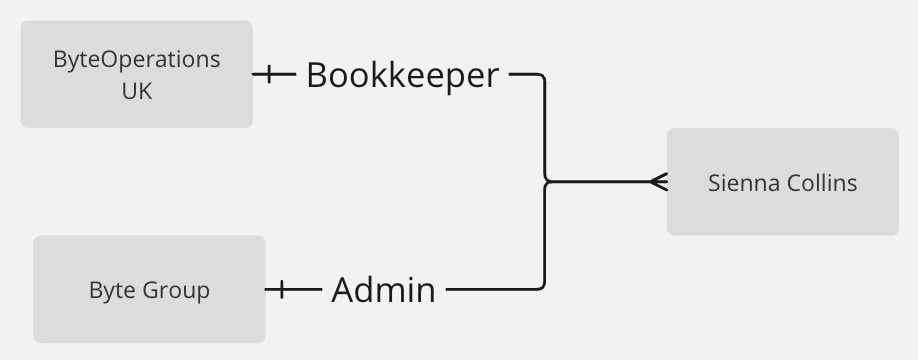
Relationships between Sienna Collins and the two different roles she fills at both companies

Sienna's diverse roles illustrate how one individual can wear multiple hats within various companies. The importance of accurate data associations to effectively manage and personalize interactions across these roles is paramount.

For example, because Sienna holds both the Admin and Bookkeeper roles, we might want to include her in different marketing campaigns targeting both those roles. Another user who is only a Bookkeeper can easily be excluded from irrelevant HubSpot workflows for campaigns directed at Admins, but before Association Labels, it wasn’t so easy for a user like Sienna. 

How to set up Association Labels in HubSpot

To set this up in HubSpot, first create custom labels for Bookkeeper or Admin. These labels will represent the relationship types between contacts and companies.

When manually creating associations in HubSpot, you have the option to add an Association Label field. This is where you will select the appropriate custom label for each association. The screenshot below shows 2 Association Labels representing the roles: Admin and Bookkeeper.
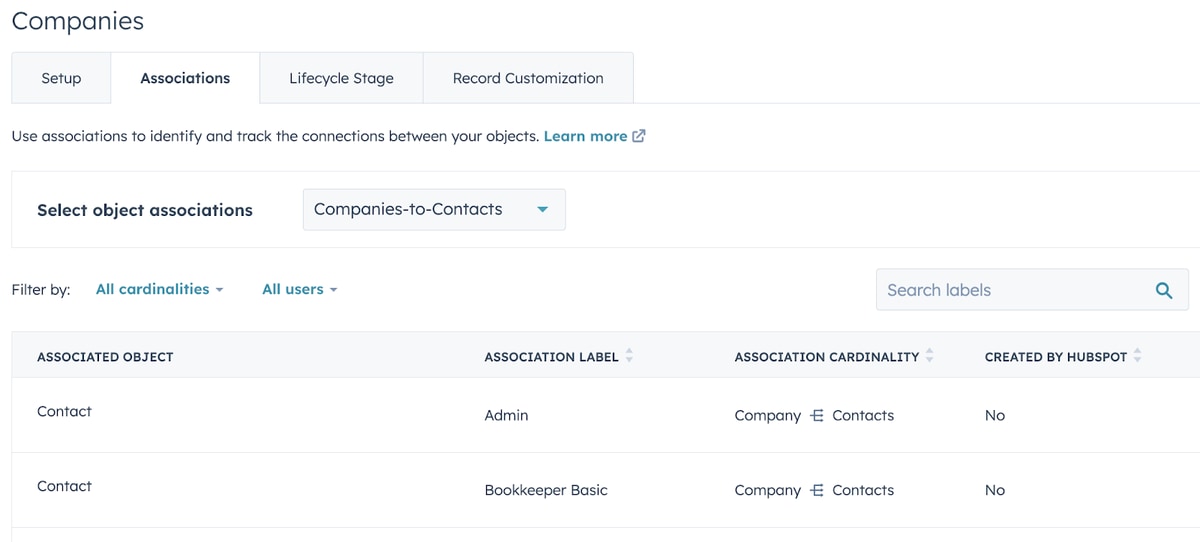
Companies-to-Contacts Associations created in HubSpot

‎Instead of putting the labels directly on the contacts, you’ll label the associations between the contacts and companies. For example, in our example above:

  • Sienna Collins and Byte Group will have the Admin label
  • Sienna Collins and ByteOperations UK will have the Bookkeeper label

Now that we’ve set up Association Labels, and have an understanding of how one contact can act in different roles across different companies, Fivetran Activations can help operationalize this setup.

How to map HubSpot Association Labels

HubSpot Association Labels sound great, right?! But imagine having to set up those associations and labels manually for hundreds of companies and thousands of contacts. Not only is this very time-consuming, it is also error-prone. Luckily, Fivetran Activations can help.

Because you already have all your company and contact information in your data warehouse, Activations easily connects that source of truth to HubSpot, allowing you to set up a Companies sync that specifically associates the correct Contacts in HubSpot in five steps:

  1. Create a column in your Activations model on top of the Company table or view in your warehouse that represents each association — Bookkeepers and Admins. 
  2. Create a JSON array of the emails associated with each of the companies — putting them in the appropriate association column.
  3. ‎In Fivetran Activations, set up a HubSpot Company sync with the company_id or your unique identifier in HubSpot as the identifier.  
  4. Map each corresponding column in the model to your newly created Association Labels in HubSpot.
  5. Run your sync. HubSpot will reflect the new associations as soon as the sync is complete.

Achieving Customer 360 Utopia

HubSpot Association Labels have allowed Pleo to bridge the gap between intricate customer relationships and targeted marketing efforts. And when Association Labels are synced to HubSpot, a new world of opportunity opens up:

  • Personalized marketing campaigns: Leverage our enriched customer data to create highly targeted and personalized marketing campaigns across various channels, improving customer engagement and conversions.
  • Segmentation and lead scoring: Utilize the comprehensive customer view to develop precise audience segments and implement lead scoring models that identify high-potential prospects for your sales team.
  • Automated workflows: Streamline repetitive tasks and processes by creating automated workflows triggered by specific customer interactions or milestones, enhancing team productivity and efficiency.
  • Revenue forecasting: Generate reliable revenue forecasts with accurate data associations, enabling leadership teams to make data-driven strategic decisions.

By automating this setup process with Fivetran Activations, Pleo achieved Customer 360 utopia. To start activating your Customer 360 data, try out Fivetran Activations today.

[CTA_MODULE]

Ready to get started with Fivetran Activations?
Start your free trial
Topics
Share

Related blog posts

Start for free

Join the thousands of companies using Fivetran to centralize and transform their data.

Thank you! Your submission has been received!
Oops! Something went wrong while submitting the form.
