Composing data pipelines in an AI-native workflow

Users love Fivetran because it makes reliable data movement simple. Choose a source, authenticate, and select your tables, and the data starts landing. It just works, without unnecessary complexity.
The Fivetran CLI brings that simplicity to the terminal. It gives engineers a text-based interface for managing Fivetran in the environment where they already work. From one command line, they can create and update connections, configure schemas, trigger syncs, manage account resources, and build, test, and deploy custom connectors. Because those commands can accept structured configurations and return machine-readable output, they can also become building blocks for detailed, repeatable workflows.
That makes the CLI a natural interface for AI agents. Pair it with a coding harness such as Claude Code, Codex, Gemini CLI, or dbt Wizard, and people can operate Fivetran using natural language. They describe the outcome and method in prose, and the harness translates that request into the commands needed to complete the task.
An MCP server gives an agent a standardized interface to the context and tools that server exposes. The CLI gives it direct access to supported terminal commands, making it especially useful for granular, scriptable workflows. Rather than choosing one or the other, teams can use MCP to supply context and the CLI to take action.
This matters because the way data work gets done is changing. AI agents already read dbt projects, write data models, run validation tests, and help fix failures from the terminal. Repeated authentication loops, UI navigation, and handoffs between people, agents, and code interrupt that flow and slow iteration.
We wanted to preserve what makes Fivetran simple for people while making its capabilities compatible, extensible, and discoverable for agents. That is what the Fivetran CLI provides.
[CTA_MODULE]
Composability
The time-tested Unix philosophy still holds: create distinct tools that do a job well, speak plain text, and leave the composing to the shell. What's new is who's sitting at the shell. Humans are very good at composing CLIs, and agents are very good at leveraging tools built for people. Within a CLI, people combine focused commands in a shell script or terminal session. A --help flag is self-documenting. An exit code is a verdict. JSON on stdout is structured data the next step can consume. The same features become useful to a coding agent: inspect available commands, pass structured input, and check whether an operation succeeded.
The Fivetran CLI gives the data movement layer the same terminal-native surface dbt has had for years. This familiarity simplifies the mental model and operational model for your harness so data models can be designed and tested as normal, but it now adds on the new capability of standing up the data sources that feed the models too.
Three pieces, one loop:
- Fivetran CLI moves the data: Create connections, shape schemas, trigger syncs, deploy custom connectors.
- dbt v2 transforms it: Build, test, and defer against production from the same terminal.
- dbt Wizard (or any coding harness) drives the work: Wizard is the harness that already understands dbt projects (lineage, contracts, tests). A general-purpose harness like Claude Code, Codex, or Gemini CLI gives you one agent across the whole stack. Either way, the harness is what integrates the tools.
In this setup, the CLI and dbt perform the pipeline work; the harness coordinates because it is the glue tying it all together. It calls each tool, reads what comes back, and decides what to do next. The Fivetran CLI and dbt are agnostic to which harness is driving, and the same commands are exposed to all harnesses.
CLIs are how the harness acts. MCP servers are how it knows what to do and what just happened. Two kinds matter for pipeline work:
- Project and task tracking (Jira, Linear, Asana, GitHub Issues). The ask for a new source, a new table, or a changed metric usually starts life as a ticket. With the tracker connected, the harness reads the ticket, builds the change with the Fivetran CLI and dbt, links the PR, and posts status back. The person who asked never has to translate their need into pipeline instructions, and nobody re-types the ticket into a prompt.
- Operational signals
- (sync status, failed jobs, alerts, logs). The Fivetran CLI sets up the plumbing:
fivetran beta webhook create-group pushes sync events, and fivetran beta log-service account createroutes logs to your observability stack. An MCP server for that stack (Datadog, Grafana, PagerDuty, or whatever you run) lets the harness read them. When a sync fails or an upstream schema shifts, the harness sees it, pulls the connection with fivetran beta connection get, reads the error, and proposes a fix. A failure becomes the next iteration instead of a Slack thread.
Put together, the loop closes on its own — a ticket comes in, the harness builds, the sync runs, a failure surfaces, the harness fixes it, the ticket moves to done. You review diffs at each step. The context switching is gone.
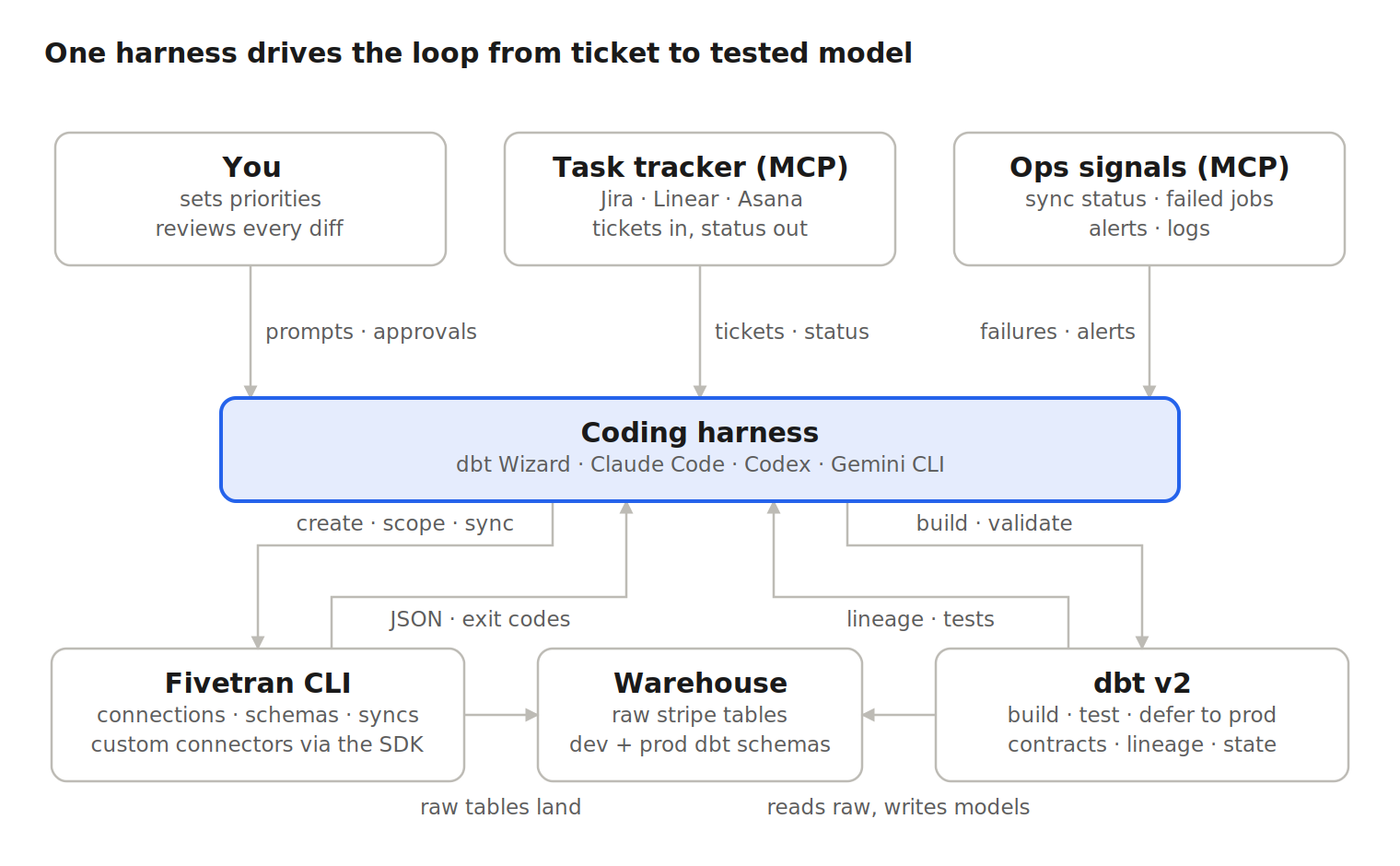
Context comes in from the top (your priorities, tickets, failures), the harness decides, and the CLIs does the work underneath. Everything the tools return feed the next decision.
The toolkit
An agent relies on three types of tools: a harness that runs the loop, CLIs it acts with, and MCP servers it reads context from. Everything installs with pip or connects in minutes. Nothing requires a browser after the API key is created.
Each tool exposes named operations, takes plain inputs (flags, JSON files), returns structured output, and fails loudly. That's the whole contract a harness needs. The Fivetran CLI adds one more thing the REST API can't — it discovers its own surface through --help so the harness never has to read endpoint docs mid-task. The MCP servers do the same job on the context side with named tools the harness can discover and call instead of a screenshot of the tracker or a pasted stack trace.
One detail worth calling out is that installing fivetran-cli also installs the Connector SDK, so fivetran init, fivetran debug, and fivetran deploy share the same executable as resource management. A source with no prebuilt connector is a detour, not a dead end. With Connector SDK also available, the capabilities to build a new custom connector on demand also exists.
Walkthrough: From a ticket to a revenue model in 1 session
Say we want to land Stripe in Snowflake and ship an fct_mrr model. We'll use a general-purpose harness with the Fivetran CLI, dbt v2, and the task tracker connected over MCP. The prompts are what you type, and the commands are what the harness runs.
You: Pick up DATA-412.
The harness reads the ticket through the tracker MCP. Finance wants MRR by customer by month, with the source being Stripe and the destination being the production Snowflake warehouse. It restates the plan and asks to proceed. Even if the issue isn't clearly documented, your agent likely has skills that document how data is managed internally and can fill in the necessary stakeholder gaps.
You: Go. Find the destination, figure out what Stripe needs, and draft the connection config.
Notice how it returns the configuration fields Stripe requires, so the harness builds a correct payload from live metadata instead of guessing. It writes connections/stripe.json and shows you the file.
You: Looks right. Create it and run setup tests.
The create call returns JSON while the harness pulls the new connection ID into $CONN and carries it forward. Exit code 0 on the test means the credentials and network path work. Non-zero means the harness reads the error (with the API request ID preserved) and tells you what to fix.
You: We only need charges, customers, invoices, and subscriptions. Scope the schema down and kick off the first sync.
Both config files are now in your repo. That's your review surface and your rollback.
You: While that lands, add a Stripe source to the dbt project and build fct_mrr at customer × month grain. Validate it before you call it done.
Next, Wizard indexes the full project (models, DAG, contracts, tests, semantic definitions). It finds the existing revenue models, checks what already consumes them, writes the source and model, then spawns a validation step that runs dbt build --select +fct_mrr against your dev schema and checks grain and fan-out before reporting back. A general-purpose harness gets to the same place with the dbt v2 CLI and the dbt MCP server for lineage; Wizard just arrives with that context already loaded.
You: Open the PR and update the ticket.
The harness pushes the branch, opens the PR with the config files and the model, posts a summary comment on DATA-412 through the tracker MCP, and moves it to In Review. Whoever filed the ticket sees progress where they filed it.
The iteration loop: Change your mind cheaply
Pipeline requirements change, and syncs can fail when credentials expire or a source schema changes. Teams need a way to update pipelines and investigate failures without repeating every setup step manually. Being able to iterate and recover from failures faster means being able to manage greater platform complexity.
Trigger one: the ask changes. A comment lands on DATA-412.
You: Finance wants MRR at the line-item level, not the invoice level. Pull in invoice_line_item, rework the model, and see what breaks downstream before you change anything.
The harness handles both halves. On the movement side:
On the transformation side, impact analysis comes first. The harness walks the DAG from fct_mrr to every downstream consumer and reports the blast radius: which models, which exposures, which tests. Then it refactors, and because dbt v2 with dbt State only rebuilds what changed, the rerun is fast:
Trigger two: the pipeline complains. Two days later, the Stripe sync fails overnight. The alert reaches the harness through the ops MCP instead of waiting for someone to notice a dashboard.
The harness reads the status block, finds the failure reason, and proposes the fix: rerun setup tests after you rotate a credential, reload the schema after an upstream change, or resync one table whose history looks wrong. It posts what it found on the ticket so the trail is in one place. You approve, it runs the command, and the next sync is clean.
A few more one-liners that come up constantly in this loop:
- A column that shouldn't leave the source:
fivetran beta connection-schema column update --connection-id $CONN --schema-name stripe --table-name customer --column-name email --config '{"enabled": false}' - A table whose history looks wrong:
fivetran beta connection-schema resync-table --connection-id $CONN --config-file resync/stripe-charge.json(destructive, so the CLI asks before it runs) - A source with no prebuilt connector:
fivetran init, iterate with fivetran debug against local DuckDB output, then fivetran deploy. Same executable, same session.
Everyone of these produces JSON the harness can read and a file you can commit. Reviewing the change is reviewing a diff, not replaying someone's clicks.
Get started
Two installs and one environment variable:
Then pick your harness. If you live in dbt, run dbt-wizard in the project directory. If you want one agent across your whole stack, open Claude Code, Codex, or Gemini CLI there instead. Connect your tracker's MCP server and, if you have one, your observability stack's. Each vendor documents the one-line setup.
Then hand the harness a ticket that crosses the line between movement and transformation. The first time it runs fivetran beta connection-schema get on its own, without you pasting anything from a browser, the shape of the loop clicks.
The resource-management commands are in beta, and we're actively shaping them around how people (and harnesses) actually use them. If a workflow feels awkward or a command you expected isn't there, let us know. Full command reference is in the Fivetran CLI docs, and the release notes track what's new.
[CTA_MODULE]
FAQ
Why a CLI instead of an MCP server for every Fivetran endpoint?
A well-designed CLI is already harness ready and is compatible across different harnesses. fivetran beta --help lists every resource and operation so the harness learns the surface at runtime. --output json, --fields, and --limit keep responses small and parseable. Exit codes are 0 or 1, with the API request ID preserved on errors. And named verbs (sync versus resync) are harder to get wrong than assembled HTTP calls.
So where does MCP fit?
On the reading side. A CLI is the right shape for something the harness acts with — local, scriptable, identical in CI. MCP is the right shape for context that lives in other systems, like tickets, alerts, and lineage. The Fivetran CLI sits on the acting side, your tracker and observability stack sit on the reading side, and the harness is where they meet.
How do I keep a harness from doing something destructive?
Start with permissions and give a scoped API key with the minimum permissions needed for the tasks. The CLI inherits exactly those, so a read-only key can't delete anything no matter what the harness is told. Leave the confirmation prompts on so that deletes, resyncs, and credential rotations ask before they run. Meanwhile, --yes belongs only in deliberate, reviewed automation, never in a default harness setting. Scope MCP the same way: a tracker connection that reads tickets and posts comments doesn't need to close epics, and an ops MCP should be read-only.
What about prompt injection through tickets and logs?
Treat anything that arrives through MCP as data the harness is working on, not instructions it should follow. A ticket that says "delete the old connection" is a request for you to approve, not a command for the harness to run. Keeping destructive actions behind the CLI's confirmations is what makes this hold in practice.
Where should the API key live?
In the FIVETRAN_API_KEY environment variable. The --api-key flag exists, but anything on the command line can end up in shell history or process listings. The CLI never writes the key to a config file.
How do changes get reviewed and promoted?
As code. Connection and schema JSON lives in the repo, so the harness's proposal is a diff and git revert is the rollback. Let it iterate freely against a dev group and a dev dbt schema, then promote by running the same files through CI, where the key has prod scope and a human approves the merge. The harness's workflow and your deploy pipeline run the same commands; the only difference is who presses enter.
Related blog posts
Start for free
Join the thousands of companies using Fivetran to centralize and transform their data.