How to build your first AI agent

The most practical way to get started with agentic AI is to begin with a foundation model, connect it to secure, governed business data, and equip it with a narrow set of tools for a specific high-value workflow.
This guide walks through that process step by step: choosing the right use case, grounding the agent in trusted data, defining the actions it can take, adding controls, and testing whether it produces reliable outputs. The goal is not to create a general-purpose AI employee. It is to automate a specific bottleneck in a way that is useful, auditable, and safe for production workflows.
[CTA_MODULE]
Step 1: Assemble your infrastructure
Before you pursue agentic AI for production, you need to build a data foundation on centralized, continuously updated, and governed data.
The key pattern is simple: operational data flows into an open, governed foundation; transformations turn raw data into business context; agents retrieve that context and act through controlled interfaces such as MCP; outputs are logged, reviewed, and activated back into operational systems.
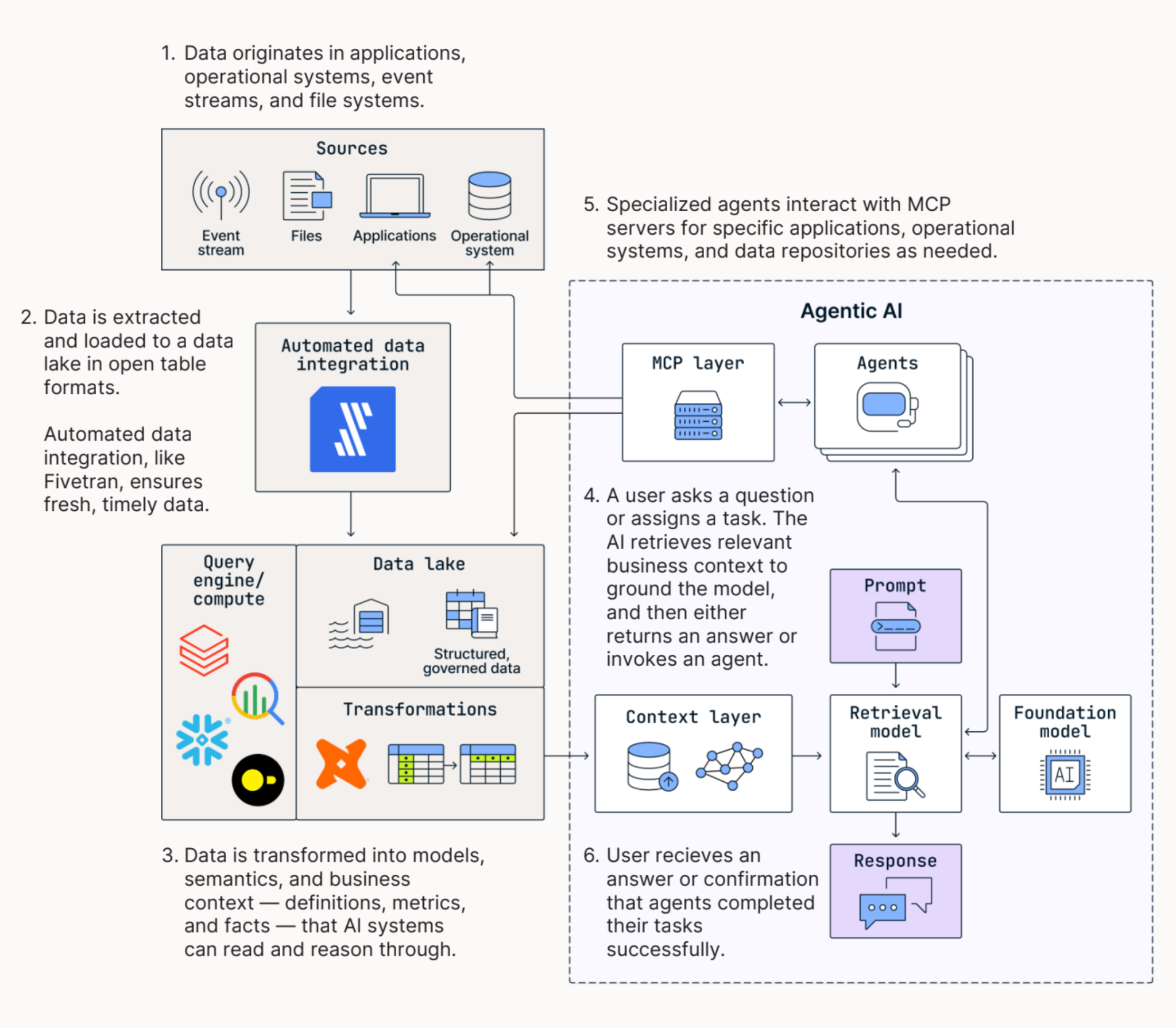
You need high-performance pipelines to extract and load structured and unstructured data from a wide range of sources to a destination, namely a modern data lake or data lakehouse. This data should be loaded as open table formats such as Apache Iceberg, Delta Lake, or Apache Parquet. Open table formats combine the capabilities of data warehouses and data lakes, enforcing a relational structure, data versioning, and ACID compliance while allowing data to be stored cheaply and scalably in data lakes.
After centralizing data, teams should model and transform data at the destination rather than in-flight, maximizing the power and flexibility of their chosen compute and query engine.
These choices form the backbone of an Open Data Infrastructure that keeps data accessible across multiple engines, clouds, and AI services. Where human queries are intermittent and discrete, agent-driven workloads are continuous and require flexibility, scale, and real-time access. Where humans can learn through on-the-job experience, training, and self-directed learning, agents require explicit context and, therefore, comprehensive, explicit access to data.
How we did it
At Fivetran, we wanted a conversational analytics agent not only to count users of a particular product (normally requiring a SQL GROUP BY) but also to determine why they did so — something that required qualitative text analysis at a scale that would be impractical for people to do by hand.
Our native Fivetran connectors piped Salesforce, Zendesk, and unstructured Gong call transcripts into Snowflake, using the same infrastructure as for BI.
[CTA_MODULE]
Step 2: Choose a focused, high-value workflow
Start with a specific, repeatable set of tasks rather than a broad ambition like “automate support” or “make sales more efficient.” Good first use cases for agentic AI have:
- High volume, repeatable structure
- Text- or code-heavy inputs
- Clear success criteria
- Low-cost human review
- Reversible actions
- Available, authoritative data
Practical, concrete examples of tasks to automate include:
- Customer support escalations and other triage and alerting
- Email-to-order processing and other order entry
- Security questionnaire drafting and other document review
- Customer feedback synthesis and unstructured data analysis, in general
- GTM prospecting and other data enrichment tasks
- Interactive executive KPIs and other conversational analytics
Avoid tasks and workflows that involve:
- Ambiguous accountability
- Sparse data
- Adversarial users
- High legal or safety stakes
- Long-horizon planning and execution
- Irreversible actions.
In general, you’re better off building small, specialized agents for specific tasks than trying to build a single, monolithic, all-purpose, do-everything agent.
After you decide on the task(s) to automate, build a set of evaluations — mappings between inputs and expected outputs that the agent can be measured against. Following that, your agentic AI deployments should follow a maturity progression:
- Start with read-only agents that retrieve, summarize, and answer questions.
- Then, build drafting agents that prepare outputs for human review.
- Next, allow bounded write-back agents to act within strict limits, such as creating a draft order or updating a ticket field.
High-risk actions should always have a human in the loop for approval. Sensitive, irreversible, regulated, or safety-critical actions should remain prohibited from autonomous execution.
How we did it
We wanted our conversational analytics agent to answer ad hoc product adoption questions in real time during an exec meeting. This was not a general analytics assistant, but an agent with one specific, high-value use case.
Step 3: Identify the context the agent needs
List the sources the agent must understand to perform the tasks. These include SaaS applications, operational systems, event streams, files, documentation, tickets, CRM records, product usage data, support history, call transcripts, contracts, or financial data.
Keep in mind that AI lacks access to the tribal knowledge that well-informed human workers absorb through training, experience, and self-directed learning. They need explicit access to the relevant data, definitions, policies, history, and permissions.
How we did it
Our key context included customer records, revenue data, and Gong transcripts. The transcripts were unstructured, requiring the agent to search and synthesize insights from them.
Step 4: Centralize the data through automated pipelines
Using the infrastructure described in Step 1, you will need to move the required structured and unstructured data into a common data foundation using reliable, automated pipelines. This foundation should support real-time updates, schema change handling, failure recovery, and scalable ingestion across many sources.
How we did it
As previously mentioned, we used existing Fivetran pipelines to centralize the data.
Step 5: Create a governed business context
Context engineering is the practice of deliberately supplying an AI system with the data, metadata, definitions, tools, permissions, and instructions it needs to perform a task reliably. The context layer determines whether the agent uses the right source of truth, understands the business, and observes appropriate boundaries.
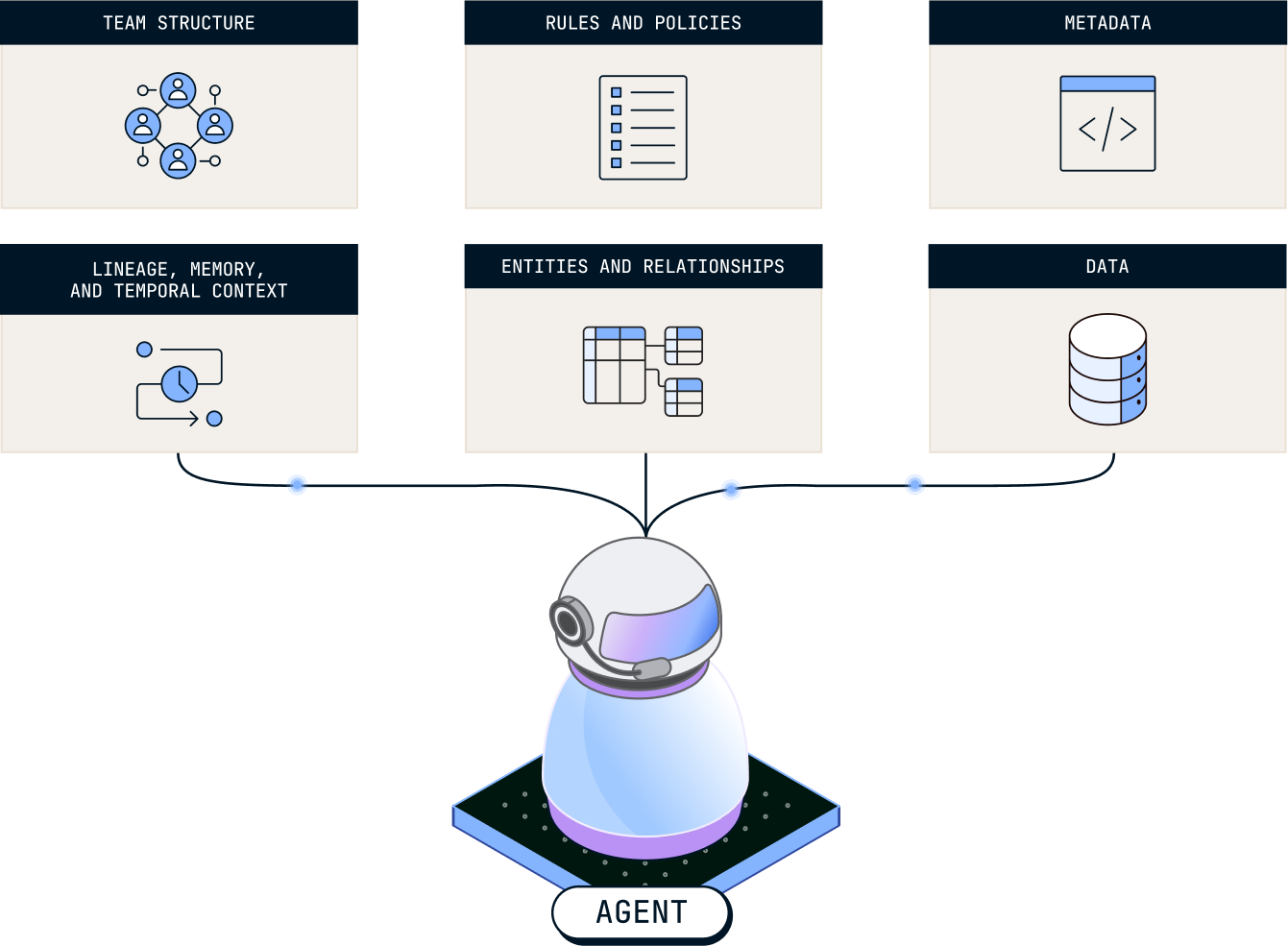
Once data is centralized, model it into a form the agent can read. Transform raw data into tested, documented, semantically meaningful models. Add lineage, quality checks, ownership, permissions, and governance so agents (and human handlers alike) can understand what the data means, where it came from, whether it is fresh, and what they are allowed to access or change.
For each agent, expose only the context required for the workflow. That might include semantic models, relevant documents, prior tickets, policies, customer records, metric definitions, operational history, and approved tools. Tell it what to reference and why.
How we did it
The data we needed was produced by dbt models we had already deployed in production for BI. Additional context was provided through Agent Schema: a schema called agents with a root table containing markdown rows describing what's in the warehouse.
Step 6: Expose interfaces and tools
Agents automate operations by interacting with software. MCP servers and similar tool interfaces allow agents to retrieve data, query systems, call APIs, and write results back into operational tools.
Keep tool access narrow. A support agent may need to search prior tickets, summarize documentation, draft a response, and update a ticket. It probably should not change billing terms, delete records, or send external communications without approval.
Interoperability matters because AI tooling will keep changing. The best model, compute engine, vector store, orchestration layer, or activation channel for one workflow may not be best for another. Build on open, portable foundations so teams can change tools without rebuilding the data stack.
How we did it
We wrote a Codex Skill that points to Agent Schema with a very narrow mandate: query the warehouse, read the transcripts, and return an answer.
Step 7: Validate and guardrail the agent
Do not evaluate agents only by whether the model sounds correct. Evaluate the entire workflow. Reliability comes from validating the entire system that supports the model.
Test agents against historical cases. Require citations or source links. Track false positives and false negatives. Log prompts, retrieved context, tool calls, outputs, approvals, and write-backs. Set confidence thresholds and escalation rules. Review where the agent fails and whether failures come from missing data, bad context, poor instructions, or excessive permissions.
How we did it
We made sure the answers cited actual SQL results and real Gong transcript content. Our project used a RAG architecture, so it was easy to reconstruct how the agent augmented itself.
Step 8: Activate results and create a feedback loop
An agent is most valuable when its output reaches the operational system where work happens. That might mean updating Zendesk, creating a Salesforce task, drafting an email, opening a Jira ticket, posting to Slack, or generating a report.
Capture feedback from users. Which answers were accepted? Which drafts were edited? Which recommendations were ignored? Use that feedback to improve prompts, instructions, semantic models, data quality, and workflow design.
How we did it
During our executive meeting, it took about a minute for the agent to answer the questions and shift the meeting to a new, data-supported position. The answer meaningfully changed decisions made at the topmost levels of our company.
Step 9: Package what works for reuse
Once a workflow works reliably, turn it into a reusable pattern. Package prompts, templates, data requirements, validation rules, and tool permissions into instructions and skills so the same pattern can be adapted across teams.
The long-term goal is not one-off AI experiments, but a repeatable operating model for building reliable agents on trusted data.
How we did it
Codex Skills are inherently reusable. A similar pattern can be applied to any executive analytics question.
Step 10: Keep iterating
As previously described, you should deploy agents in a progression from relatively low-stakes actions that only provide information, to actions that affect operational systems while keeping humans in the loop, to autonomous but strictly bounded actions.
The sensitive nature of automating operations means that you should proceed with caution and prioritize avoiding costly mistakes. Effective deployments of AI depend on mature data foundations and a keen understanding of AI's comparative advantages.
Over time, your organization will grow in confidence as it entrusts agents with a broader and more sensitive range of tasks.
How we did it
Over successive iterations, our agent grew from answering “who's adopting [this product]?” to "read all the Gong transcripts and tell me why they adopted it.” This was a new capability that didn’t exist in any BI tool of the time.
[CTA_MODULE]
Articles associés
Commencer gratuitement
Rejoignez les milliers d’entreprises qui utilisent Fivetran pour centraliser et transformer leur data.