

Try every activation for free
Each new activation comes with a 14-day free trial.
Activation Information

Activation destination
Automatically sync product & sales data to save time on monthly reporting and get data into your favorite tools.
Try every activation for free
Each new activation comes with a 14-day free trial. Get started today!
Get started for free
Activation source docsConnector Information
Activation destination
Zuora
Automatically sync product & sales data to save time on monthly reporting and get data into your favorite tools.
USe cases
360° Customer Profiles
Your stack is composed of 10+ tools. Each one has data about your customers; none have the full picture. With Fivetran, unify that siloed data into a bespoke 360° customer profile that stays in sync across all tools, so your team doesn't have to go to 5 different places to understand their customers.
Account Team Members
Track your account team members and their association in sales deals and custom sales goals to determine sales commissions, hitting their sales goals and/or sales targets.
Upsell Opportunities
Monitor customer behavior for signals that an account is ready to move to a higher usage tier. Prioritize ready accounts and alert account representatives proactively when it's time to engage accounts.
Dynamic Audiences
Create granular segments or audiences based on any data so you can send personalized emails, show ads to inactive users to reengage them, promote new features to users who will benefit the most, and many more use cases.
.svg)
Account
Some operations in this section are similar to each other, but are provided for different use scenarios. You should choose the one that best suits your needs. For example, the Create account operation is used to create an account with a credit card payment method, a bill-to contact, and optionally an sold-to contact or an associated subscription. If you want to create an account without creating any associated objects such as subscriptions, use CRUD: Create Account instead.
Subscription
The REST API reference describes how to create a new subscription in preview mode. This call does not require a valid customer account. It can be used to show potential new customers a preview of a subscription with complete details and charges before creating an account, or to let existing customers preview a subscription with all charges before committing.
Real-world results
%20(1)%20(1).png)
“Fivetran has been a life-changer. The team can focus on more important things instead of just making sure data gets from point A to point B. Now we can develop, automate, and deploy a bespoke audience same day.”

Make data more accessible to drive better business outcomes
Explore Fivetran Activations
Decrease manual work
200+ pre-built, automated activation destinations decreases repetitive work.

Improve efficiency
Self-service data enrichment features make data more accessible.

Increase growth
Deliver insights directly into the business tools where your teams.
Resources
Get started with activations
FAQ
Common questions
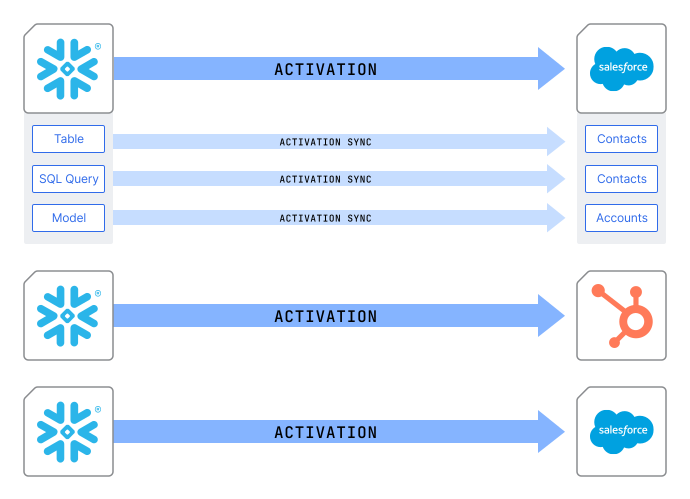
What is an activation?
Example:
All syncs from Snowflake → Salesforce A = one activation
All syncs from Snowflake → HubSpot = another activation
All syncs from Snowflake → Salesforce B = third activation
Activations are priced based on usage. You pay only for the new data activated each month. Visit our pricing page to learn more.