Introducing Fivetran init: Accelerate custom connector development
A new CLI command that scaffolds AI-ready Connector SDK projects in seconds.
January 12, 2026

The Fivetran Connector SDK empowers data teams to build custom integrations to proprietary systems, internal APIs, and niche data sources while Fivetran manages the underlying infrastructure, scheduling, and data delivery. Today, we're making it even easier to get started.

fivetran init is a new CLI command that eliminates setup friction and integrates with your favorite AI-assisted workflows. With fivetran init developers get a scaffolded project structure, clearly explained starter code (if you choose to start from a template), and pre-configured context for their preferred AI coding assistant.

[CTA_MODULE]

Even faster time to value

Every custom connector project starts the same way: 

  1. Create a directory
  2. Set up the file structure
  3. Find example code
  4. Configure your development environment. 

These steps aren't complex, but friction adds up over time, especially for teams building multiple connectors or just getting started with the connector SDK.

The fivetran init command streamlines this entire process:

  • Instant project scaffolding: Creates a complete, ready-to-code project structure with a single command
  • Template-based initialization: Start from our library of quickstart examples and production-ready connector patterns, downloaded directly from the fivetran_connector_sdk GitHub repository
  • Flexible project paths: Initialize in the current directory or specify any target location. The command creates the directory if it doesn't exist
  • Always current: Templates are pulled live from our repository, ensuring you start with the latest SDK patterns and best practices

Install or upgrade the latest version of Fivetran Connector SDK with pip install --upgrade fivetran-connector-sdk, then run fivetran init to scaffold your first project.

Built for AI-assisted development

AI coding assistants have transformed how developers write and debug code. Tools like Claude, Cursor, and GitHub Copilot can dramatically accelerate development—but their effectiveness depends on having the right context for the frameworks and patterns they work with.

The fivetran init command addresses this directly. After downloading your project template, it prompts you to select your preferred AI development environment:

  • Claude
  • Cursor
  • VSCode with Copilot
  • Skip (if you've already configured AI context)

Based on your selection, the command downloads an AGENTS.md file containing Connector SDK-specific instructions for your AI assistant. This file provides context about required import patterns, standard connector architecture, state management conventions, logging best practices, and code structure aligned with Fivetran's documentation.

The result: your AI assistant understands the Connector SDK from the first prompt. It generates code that follows established patterns, uses the correct operations, and adheres to best practices. This reduces iteration cycles and accelerates development.
See it in action

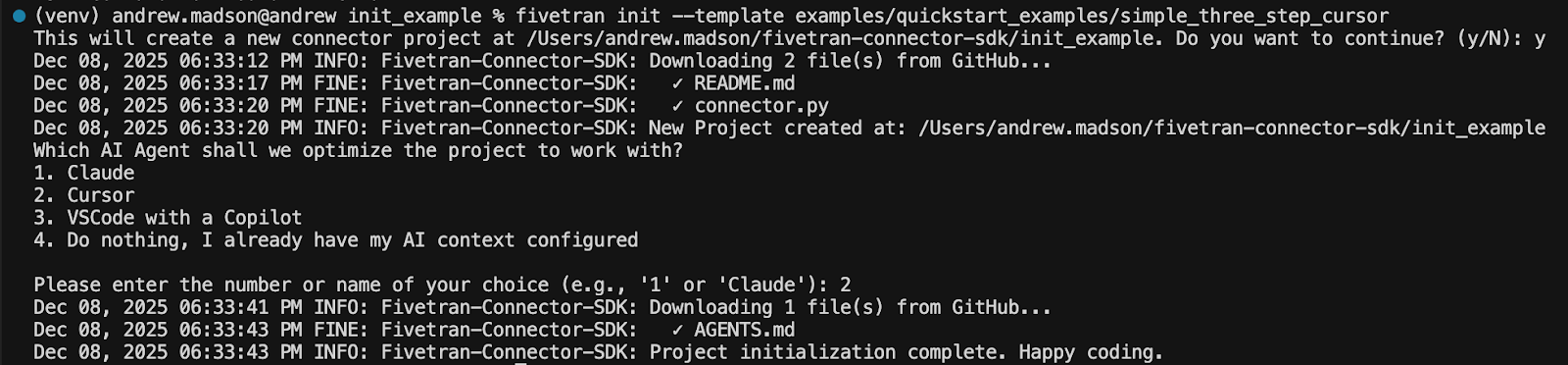
Here's how quickly you can scaffold a new connector project. This example uses the simple_three_step_cursor quickstart template. This is a working example that demonstrates cursor-based incremental syncing using emulated data, ideal for learning SDK patterns without external dependencies.

fivetran init --template examples/quickstart_examples/simple_three_step_cursor

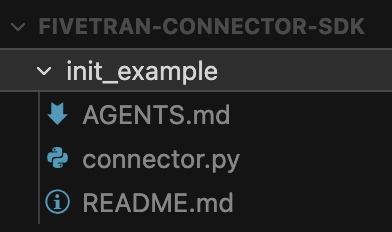
The command confirms your project location, downloads the template files (connector.py and README.md) from GitHub, prompts for your AI assistant preference, and downloads the corresponding AGENTS.md file. Within seconds, the project is ready for development. Note that some projects will also need a configuration.json file to function.
From there, the standard Connector SDK workflow applies: run fivetran debug to test locally with the built-in emulator, then fivetran deploy when you're ready for production.

The bigger picture

The Connector SDK represents Fivetran's commitment to extensibility. While our library of 700+ pre-built connectors covers the most common data sources, we recognize that every organization has unique integration needs, whether proprietary systems, industry-specific platforms, custom schemas of existing connectors, or internal APIs.

The fivetran init command lowers the barrier to building these custom integrations. Combined with AI-assisted development, teams can now prototype connectors quickly. 

Getting Started

The command is available now in the latest version of the Connector SDK. Install or upgrade with pip install --upgrade fivetran-connector-sdk, then run fivetran init to scaffold your first project.

For complete documentation, visit the Connector SDK documentation and the CLI commands reference. Our GitHub repository contains the full library of example templates, from simple quickstarts to production-ready connector patterns for databases, APIs, and file-based sources.

Happy building!

[CTA_MODULE]

Data insights
Data insights

Introducing Fivetran init: Accelerate custom connector development

Introducing Fivetran init: Accelerate custom connector development

January 12, 2026
January 12, 2026
Introducing Fivetran init: Accelerate custom connector development
A new CLI command that scaffolds AI-ready Connector SDK projects in seconds.

The Fivetran Connector SDK empowers data teams to build custom integrations to proprietary systems, internal APIs, and niche data sources while Fivetran manages the underlying infrastructure, scheduling, and data delivery. Today, we're making it even easier to get started.

fivetran init is a new CLI command that eliminates setup friction and integrates with your favorite AI-assisted workflows. With fivetran init developers get a scaffolded project structure, clearly explained starter code (if you choose to start from a template), and pre-configured context for their preferred AI coding assistant.

[CTA_MODULE]

Even faster time to value

Every custom connector project starts the same way: 

  1. Create a directory
  2. Set up the file structure
  3. Find example code
  4. Configure your development environment. 

These steps aren't complex, but friction adds up over time, especially for teams building multiple connectors or just getting started with the connector SDK.

The fivetran init command streamlines this entire process:

  • Instant project scaffolding: Creates a complete, ready-to-code project structure with a single command
  • Template-based initialization: Start from our library of quickstart examples and production-ready connector patterns, downloaded directly from the fivetran_connector_sdk GitHub repository
  • Flexible project paths: Initialize in the current directory or specify any target location. The command creates the directory if it doesn't exist
  • Always current: Templates are pulled live from our repository, ensuring you start with the latest SDK patterns and best practices

Install or upgrade the latest version of Fivetran Connector SDK with pip install --upgrade fivetran-connector-sdk, then run fivetran init to scaffold your first project.

Built for AI-assisted development

AI coding assistants have transformed how developers write and debug code. Tools like Claude, Cursor, and GitHub Copilot can dramatically accelerate development—but their effectiveness depends on having the right context for the frameworks and patterns they work with.

The fivetran init command addresses this directly. After downloading your project template, it prompts you to select your preferred AI development environment:

  • Claude
  • Cursor
  • VSCode with Copilot
  • Skip (if you've already configured AI context)

Based on your selection, the command downloads an AGENTS.md file containing Connector SDK-specific instructions for your AI assistant. This file provides context about required import patterns, standard connector architecture, state management conventions, logging best practices, and code structure aligned with Fivetran's documentation.

The result: your AI assistant understands the Connector SDK from the first prompt. It generates code that follows established patterns, uses the correct operations, and adheres to best practices. This reduces iteration cycles and accelerates development.

See it in action

Here's how quickly you can scaffold a new connector project. This example uses the simple_three_step_cursor quickstart template. This is a working example that demonstrates cursor-based incremental syncing using emulated data, ideal for learning SDK patterns without external dependencies.

fivetran init --template examples/quickstart_examples/simple_three_step_cursor

The command confirms your project location, downloads the template files (connector.py and README.md) from GitHub, prompts for your AI assistant preference, and downloads the corresponding AGENTS.md file. Within seconds, the project is ready for development. Note that some projects will also need a configuration.json file to function.

From there, the standard Connector SDK workflow applies: run fivetran debug to test locally with the built-in emulator, then fivetran deploy when you're ready for production.

The bigger picture

The Connector SDK represents Fivetran's commitment to extensibility. While our library of 700+ pre-built connectors covers the most common data sources, we recognize that every organization has unique integration needs, whether proprietary systems, industry-specific platforms, custom schemas of existing connectors, or internal APIs.

The fivetran init command lowers the barrier to building these custom integrations. Combined with AI-assisted development, teams can now prototype connectors quickly. 

Getting Started

The command is available now in the latest version of the Connector SDK. Install or upgrade with pip install --upgrade fivetran-connector-sdk, then run fivetran init to scaffold your first project.

For complete documentation, visit the Connector SDK documentation and the CLI commands reference. Our GitHub repository contains the full library of example templates, from simple quickstarts to production-ready connector patterns for databases, APIs, and file-based sources.

Happy building!

[CTA_MODULE]

Already a Fivetran customer? Try out Connector SDK.
Try it
Begin a free trial of Fivetran to see what Connector SDK offers.
Sign up
Topics
Share

Articles associés

Commencer gratuitement

Rejoignez les milliers d’entreprises qui utilisent Fivetran pour centraliser et transformer leur data.

Thank you! Your submission has been received!
Oops! Something went wrong while submitting the form.