Run local AI queries on your data lake with DuckDB and Claude


The way we interact with data is changing fast. AI assistants can now write SQL, interpret results, and surface insights in natural language — but most implementations still assume a full cloud warehouse sits underneath. What if you could get the same AI-powered data experience right from your laptop?
This post walks through how to connect Claude Desktop directly to a Fivetran-powered data lake using DuckDB as the compute engine — and why that flexibility matters for the future of Open Data Infrastructure.
[CTA_MODULE]
What Is Open Data Infrastructure?
Open Data Infrastructure (ODI) is an architectural approach built around one core idea: your data should not be locked into any single vendor's proprietary format or compute engine.
In a traditional data stack, data flows from source systems into a cloud data warehouse — where it lives in a proprietary format, queryable only through that platform's engine. The warehouse is the center of gravity. Everything else orbits it.
ODI flips this model. Data is stored in open formats (Apache IcebergTM, Parquet, Delta Lake) in open storage (S3, GCS, ADLS), managed by open catalog standards (Apache Polaris). Compute — the actual query engine — is decoupled from storage and becomes a pluggable layer.

Fivetran plays a core role in ODI through its data lake layer. Through its Managed Data Lake Service, Fivetran syncs data from any source directly to a data lake in Apache Iceberg and Delta Lake format, managed by a Apache Polaris catalog. Every connector Fivetran supports — databases, SaaS tools, event streams — can now land data directly into your open lake.
The compute layer above that storage is deliberately open. Enterprises running at scale reach for Snowflake, Databricks, or BigQuery to query their Iceberg tables — these platforms all support Iceberg natively and bring the governance, performance, and collaboration features that production workloads require.
But "open compute" also means something smaller is possible. That is where DuckDB comes in.
Introducing DuckDB, Claude, and MCP
DuckDB: Warehouse-class SQL on your laptop
DuckDB is an in-process analytical SQL engine. It runs as a library — no server, no cluster, no configuration. Despite its simplicity, it handles complex analytical queries with performance that rivals traditional warehouses for single-machine workloads.
Critically for ODI, DuckDB supports Apache Iceberg natively. Point it at an S3 bucket with a Apache Polaris catalog and it reads Iceberg tables as if they were local files. The same data that Snowflake or Databricks queries in production can be queried locally by DuckDB because the format is open.
If you'd like to connect DuckDB to your Fivetran Managed Data Lake to query Iceberg, see here.
Claude: AI that reasons about data
Claude is Anthropic's AI assistant. It understands SQL, interprets query results, and can reason across multiple queries to answer complex analytical questions in plain English. Rather than replacing the analyst, it removes the friction between a question and an answer.
MCP: The bridge between Claude and your data
The Model Context Protocol (MCP) is an open standard that allows AI models to call external tools. By writing a small MCP server that wraps a DuckDB connection to your Iceberg catalog, Claude Desktop can query your live Fivetran-synced data directly — no export, no copy, no API middleware.
The architecture is 3 components working together:

Data flows from your sources into open storage via Fivetran. DuckDB reads it locally. The MCP server exposes a run_sql_query tool. Claude uses that tool to answer your questions.
How data interaction works now
Once the stack is running, querying your data lake becomes a conversation.
1. Explore what's available
Ask Claude "what schemas are available in Iceberg?" and it queries the catalog, groups schemas by source type, and gives you a structured overview of everything Fivetran has synced — Postgres databases, SQL Server instances, MongoDB clusters, SAP systems — each one a live connector landing in your lake.

2. Drill into a schema
"What tables are available in aurora_postgres_animal_crossing?" — Claude identifies 32 tables and immediately organizes them by domain: Clothing & Accessories, Furniture & Décor, Tools & Equipment, Collectibles, Game Mechanics. It understands the structure without any schema documentation from you.

3. Understand what the data means
"Explain what I can do with this data" — Claude reasons across the schema, describes what each group of tables contains, and maps out concrete analysis possibilities: price analysis across item categories, collecting strategies by season, crafting dependency graphs, economy tracking by bell value. Under the hood, Claude pulls all the required context by querying Apache Polaris metadata and even evaluating the data itself, by pulling one row of data for each table.

4. Go deeper without writing SQL
"Create a dashboard" — Claude runs a series of queries across the tables, aggregates the results, and generates a full interactive visualization. The resulting Shop & Catalog Finance Report has four tabs — KPIs, shop price comparisons, Critterpedia highlights, and style analysis — all built from your live Iceberg tables without you writing a single line of SQL or touching a BI tool.
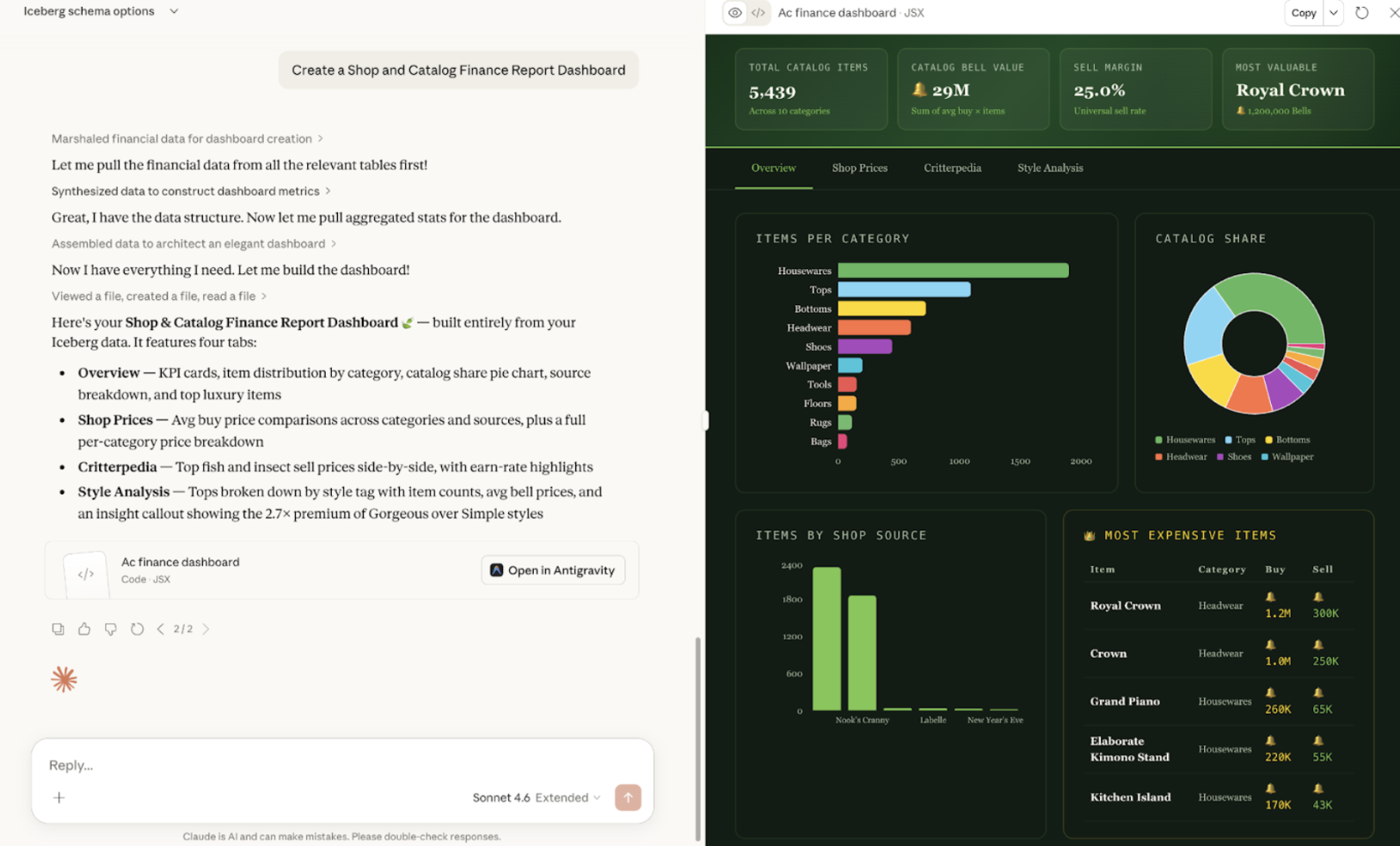
None of this required opening a SQL editor, configuring a BI tool, or writing a single line of code. The interaction layer is natural language. The data layer is open and live.
What this unlocks for data teams
AI isn’t replacing analysts — it’s removing the friction between questions and answers. Instead of spending most of their time writing SQL, teams can explore data conversationally and focus on interpretation and action.
This works because the data lives in an open, shared format. The same Iceberg and Delta tables can be queried by DuckDB locally, transformed in Databricks, visualized in BI tools, or accessed through AI — all without moving or duplicating data.
That’s the advantage of Open Data Infrastructure: no lock-in, no re-ingestion, no migration overhead. Data stays in one place, and teams choose the best tools — including AI — to work with it.
Try it yourself
The full setup takes about 15 minutes and requires a Fivetran account with a Managed Data Lake Service destination, an AWS S3 bucket, and an Anthropic API key for Claude Desktop.
Prerequisites
- Fivetran with Managed Data Lake Service destination configured (Apache Polaris Iceberg on S3)
- DuckDB installed
- Claude Desktop installed
- Python 3.9+
Step 1: Configure Fivetran
Set up a connector and point it to the Managed Data Lake Service destination. Fivetran syncs your source data to S3 in Iceberg format and registers it in the Apache Polaris catalog automatically.
Step 2: Get the MCP and add your credentials
git clone https://github.com/fivetran/odi-duckdb.git
cd odi-duckdb
cp .env_example .env
# Fill in your Apache Polaris endpoint, client credentials, and AWS keys
Step 3: Set up the Python environment
python3 -m venv .venv
.venv/bin/pip install duckdb mcp pytz
Step 4: Register the MCP server with Claude Desktop
Add to ~/Library/Application Support/Claude/claude_desktop_config.json:
{
  "mcpServers": {
    "duckdb-iceberg": {
      "command": "/path/to/odi-duckdb/.venv/bin/python3",
      "args": ["/path/to/odi-duckdb/mcp_server.py"]
    }
  }
}
Step 5: Restart Claude Desktop
Restart Claude and ask anything about your data:
"What schemas are available in my Iceberg catalog?"
"Show me the top 10 rows from the orders table."
"How much revenue has been generated in the last 30 days?"
Claude will write and run the SQL, interpret the results, and answer in plain English — with your live Fivetran-synced data underneath.
Open Data Infrastructure is not just an architectural diagram. It is a set of bets on open formats and open standards that make the data layer composable and portable. Fivetran's Managed Data Lake Service delivers data into that layer. DuckDB and Claude let you query it from anywhere — including your laptop.
The warehouse is still there when you need it. But it is no longer the only option.
The MCP server and DuckDB setup used in this post are available at https://github.com/fivetran/odi-duckdb.git.
Apache Iceberg is a trademark of the Apache Software Foundation.
Apache Polaris is a trademark of the Apache Software Foundation.
[CTA_MODULE]
Verwandte Beiträge
Kostenlos starten
Schließen auch Sie sich den Tausenden von Unternehmen an, die ihre Daten mithilfe von Fivetran zentralisieren und transformieren.